Posts

Showing posts from August, 2022

GIT - 4

Image
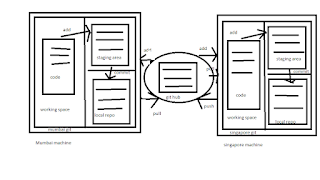
 how to commit, push & pull from github ======================================= ->login into mumbai EC2 instance -> create one directory and go inside it -> git init -> touch myfile (put some data) -> git status -> git add .   (like adding a file in staging area) -> git commit -m "1st commit from mumbai" (like adding a file in local repo) -> git status -> git log -> git show <commit-id> -> git remote add origin <centralgit url> -> git push -u Origin master (enter username and password) Recently There is having a change in accessing the github. Recently github have started token system for transferring files. Need to login github >> Settings >> Developer settings >> Personal Access Tokens >> Generate new token >> Give the name for the token and select the repo in the scope.... After the token is generated copy the code in the notepad. Therefore while PUSH and PULL to and from ORIGIN you ...

GIT - 5

  How to create Branch, Merge & Stash ============================================  _____0 branch (little branch) |(start) 0--------------0------0---------------0 (master) master      commit   commit    |                                |_______0______0_____0(big features) The diagram above visualizes a Repository with two isolated lines of development, one for a little features, and one for a longer-running features. By developing them is Branches, it's not only possible to work on both of them in parallel but it also keeps the main master branch free from error. -> Each task has one separate branch. -> After done with code, Merge other branches with master. -> This concept is useful for parallel developments. -> you can create any no. of branches. -> changes are personal to that particular branch. -> default branch is 'Master' -> files cr...

GIT - 3

 How to use git and create github account ========================================= AWS account-> create two EC2 instance (Linux) allow ssh and http port in security group. on first machine. ================ -> sudo su  -> yum upate -y -> yum install git -y -> git --version  or which git -> git config --global user.name "bhupinder" -> git config --global user.email "bhupinder@gmail.com" -> git config --list on second machine ================= -> sudo su  -> yum upate -y -> yum install git -y -> git --version  or which git -> git config --global user.name "Ajay" -> git config --global user.email "Ajay@gmail.com" -> git config --list

GIT - 2

 Stages of GIT and its terminology ================================== Git is DVCS. It is created by linus. It is software. Github is a service. it is not git. It is like storage  Gitlab is a service. it is not git. It is like storage  stage of GIT/workflow ----------------------- 1. Workspace/working directory 2. Staging area 3. Local Repo Repository: ========== -> Repository is a place where you have all your codes or kind of folder on server. -> It is a kind of folder related to one product. -> Changes are personal to that particular Repository. Server: ====== -> It stores all Repositories. -> It contains metadata also. Working Directory: ================= -> Where you see files physically and do modification. -> At a time, you can work on particular branch. In other CVCS, develpers generally makes modificatons and commit there changes directly to the repository but git uses a different strategy. Git does not track each and every modified file whene...

GIT - 1

 Introduction of GIT ==================== software configuration management   or source code management a) Centralised version control system b) Distributed version control system CVCS ---- drawbacks: --------- 1) It is not locally available, meaning you always need to be connected to a network to perform any action. 2) since everything is centralised, if central server gets failed, you will lose entire data. Eg- SVN tool. DVCS ---- In distributed version control system, every contributor has a local copy or 'clone' of the main repository. I.e. everyone maintains a local repository of their own which contains all the files and metadata present is Main repository. Difference between CVCS and DVCS CVCS ----- 1) In Cvcs, a client need to get local copy of source from server, do the changes and commit those changes to central source of server. 2) CVCS  system are easy to learn and setup. 3) working on braches is difficult in cvcs developer often  faces merge con...

Docker interview questions

 Q1 what is docker? ans it is mechanism which is used to create containers. containers are isolated environment to run your application. Q what is the advantage of Docker over hypervisors?  Docker containers use docker-engine instead of the hypervisor, like in virtual machines. As the host kernel in not shared, using docker-engine makes containers small, isolated, compatible, high performance-intensive and quickly responsive. Q what is docker images? Ans it is snapshot of base image. It combination of code and base machine library files. it does not have stages like running or stop, exit and paused Q what is docker container? ans it is running instance of docker image. it does have stages like running and stop, exit, paused. Q what is docker hub? ans it is registary where you can download mulitple images.  Q how to create docker container? docker run -it image shell Q how many container can run per host? there is no such limit. it is totally depend on hardware capability....

Docker - 6

 How to psuh docker image in dockerhub ===================================== Now go to putty -> Login as -> Sudo su -> yum update -y -> yum install docker -y -> service docker start -> docker run -it ubuntu /bin/bash Now create some files inside container Now create image of this container -> docker commit container1 image1 Now create account in hub.docker.com Now go to your server -> docker login -> enter your username and password Now give tag to your image -> docker tag image1 docker id/newimage -> docker push dockerid/newimage Now you can see this iamge in docker hub account Now create one instance in tokyo region and pull image from hub -> docker pull dockerid/newimage -> docker run -it --name mycon dockerid/newimage /bin/bash Some Important commands ===================== 1) Stop all running containers: docker stop $(docker ps -a -q) 2) Delete all stopped containers: - docker rm $(docker ps -a -q) 3) delete all images:- docker rmi -f $(do...

Docker - 5

 Docker Port Expose ==================== Container does not have its own ip adddress. it use host's ip address to communicate with outer world. we use port to connect the specfic container. We mapped host port with container port so we can communicate the container which we have connected recently. host port can be rename but container port can not be rename like port 80 can not be 81 in container. -> login into AWS account create one linux instance Now go to putty -> login to your account. -> sudo su  -> yum update -y -> yum install docker -y -> docker run -td --name techserver -p 80:80 ubuntu  (d - daemon means start the container but do not let me enter it) -> docker ps -> docker port techserver 0/p -> 80/tcp --> 0.0.0.0/80 -> docker exec -it techserver /bin/bash (exec mean it will let you enter in the container but it will fresh start the process.) -> apt-get update -> apt-get install apache2 -> cd /var/www/html -> echo "Su...

Docker - 4

 Docker volume and how to share it ---------------------------------- -> Volume is simply a directory inside our container. -> Firstly, we have to declare the directory as a volume and then share the volume. ->Even if we stop container, still we can access volume. -> volume will be created in one container. -> you can declare a directory as a volume only while creating conatiner. -> you can not create volume in existing container. ->  you can share one volume across any number of containers. -> volume will not be included when you update an image. you can mapped volume in two ways 1. Container <---> container 2. Host <-----> container. ======================================================================= 1)Docker create( to create the container) 2)Docker start(to run the container) 3)Docker run( to create and start the container) benefits of volume ----------------- -> Decoupling container from storage ->share volume among different ...

Docker - 3

 How many ways do we have to create image? 1) when you pull the image from docker hub. 2) when you work on existing container, make a new image from existing and working container and use in future. 3) use docker file to create a container/image --> login into AWS account and start your EC2 instance access it from putty --> now we have to create container from our own image therefore, create one container first --> docker run -it --name bhupicontainer ubuntu /bin/bash --> cd tmp/ now create one file inside this tmp directory -> touch myfile Now if you want to see the difference between the base image and changes on it then --> docker diff bhupicontainer o/p -> C /root        A /root/.bash-history        C /tmp        A /tmp/myfile D - deletion C - change A - append Now create image of this container  docker commit newcontainer updateimage(new image name) --> docker images Now create container f...

Docker - 2

basic commands in docker ------------------------ login to docker (docker login) -> to see all images present in your local machine. docker images -> to find out images in docker hub docker search jenkins  (first logout from docker) -> to download image from dockerhub to local machine docker pull jenkins -> to give name to container docker run -it --name bhupinder ubuntu /bin/bash            (i- interactive mode and t - terminal ) -> to check service is start or not serice docker status ->to start container docker start bhupinder -> to go inside container docker attach bhupinder ->to see all containers docker ps -a -> to see only running containers docker ps -> to stop container docker stop bhupinder --> to delete container docker rm bhupinder how to install docker on linux machine yum update -y yum install docker -y which docker docker -v docker --version service docker status docker info service docker start  ser...

Docker - 1

 What is docker? Container is like a virtual machine. Docker is a tool which create the VM. It is a advance version of virtualisation. Docker engine is just like a hypervisior. what is docker architecture and container? -> Docker is an open-source centralised platform designed to create, deploy and run applications. -> Docker was first release in March 2013. It is developed by solomon hykes and sebastian pahl. -> Docker uses container on the host O.S. to run applications. It allows applications to use the same linux kernal as a system on the host computer, rather than creating a whole virtual O.S. --> Docker is a set of Platform as a service that uses O.S. level virtualization whereas VMware uses Hardware level viruatlisation. -->we can install docker on any O.S. but Docker engine runs natively on Linux distribution. --> Docker written in 'go' language. --> Docker is a tool that performs O.S. level virtualization also known as containerization . --> Befo...

Ansible - 5

         Conditions, Vaults and Roles in Ansible                  ================================================= Conditions --------- -> whenever we have different different scenarios, we put conditions according to the scenario When statement -------------- Sometimes you want to skip a particular command on a particular node. --- # Condition Playbook - hosts: demo   user: ansible   become: yes    connection: ssh   task:    - name: install apache on debian      command: apt-get -y install apache2      When: ansible_os_family == "Debian"    - name: install apache for redhat      command: yum -y install httpd      When: ansible_os_family == "RedHat" esc --> :wq! Note: we can use command module for linux command in playbook. =============================================================== Vault   ...

Ansible - 4

 Ansible Playbook, Variables, Handlers & Loops ------------------------------------------------------ -> Playbook in ansible are written in YAML format. -> It is human readable data serialization language. It is commonly used for configuration files. -> Playbook is like a file where you write codes consist of vars, handlers, files, templates and roles. -> Each playbook is composed of one or more 'module' in a list module is a collection of configuration files. ->Playbooks are divided into many sections like -  a) Target Section - Define the host against which playbooks task has to be executed. b) Variable Section - Define variable. c) Task section - list of all modules that we need to run in an order. YAML (Yet another markup language) ----------------------------------- -> for ansible, nearly every YAML files starts with a list. -> Each item in the list is a list of key-value pairs commonly called a dictionary. -> All YAML files have to began with ...

Ansible - 3

 Ad-hoc Commands, Modules & Playbook    (YAML means yet another markup language) --------------------------------------------    1) Ad-hoc Commands :- simple linux commands, Temporary command, there is No idempotency in adhoc commands it means it will again and again do the same task without checking that it is already exist. if we have created one file with command touch file1 then it will again run the same command and overwrite the file1 which is not good for prod environment. so it is not always good to use adhoc commands in ansible. 2) Modules :- We use YAML in module. It is used for running single work or command. 3) Playbooks:- we use YAML in playbook too but if we want to run multiple command and want to excute multiple task or work then we call it playbook. We use more than one module in it. ============================================================================================================================================================ Ad-...

Ansible - 2

 Ad-hoc commands, Modules and playback. ----------------------------------------- Go to AWS account --> create 3 EC2 instances in same AZ. Take access of all machines via putty Now go inside ansible server and download ansible package -> ec2-user -> sudo su -> wget https://dl.fedoraproject.org/pub/epel/epel-release-latest-7.noarch.rpm now do "ls" #yum install epel-release-latest.7.noarchrpm -y # yum update -y Now we have to install all the packages one by one # yum install git python python-level python-pp openssl ansible -y Now go to hosts file inside ansible server and paste private-ip of node1 and node2 #vi /etc/ansible/hosts Now the host file is only working after updating ansible cfg file # vi /etc/ansible/ansible.cfg uncommented inventory = /etc/ansible/hosts sudo-user = root Now create one user in all the three instances. # adduser ansible Now set password for this user # passwd ansible Now switch as ansible user # su - ansible this ansible user don't...

Ansible - 1

  yum install ansible -y cat /etc/ansible/hosts make an entry [ansible_clients] 192.168.2.127 ansible_ssh_pass=simplilearn ansible_ssh_user=root now create a playbook vi sample.yml --- - name: sample book   hosts: ansible_clients   remote_user: root   beocme: true   tasks:    - name: install httpd      yum:        name: httpd        state: latest    - name: run httpd      service:        name: httpd        state: started    - name: create content      copy:         content: "welcome"         dest: /var/www/html/index.html ===================================== how to check the syntax of yaml whether is correct or not? there is command in ansible ansible-playbook sample.yml(name of the playbook) --syntax-check ansible-playbook sample.yml --syntax-check  = run this c...