GIT - 2
Stages of GIT and its terminology
==================================
Git is DVCS. It is created by linus. It is software.
Github is a service. it is not git. It is like storage
Gitlab is a service. it is not git. It is like storage
stage of GIT/workflow
-----------------------
1. Workspace/working directory
2. Staging area
3. Local Repo
Repository:
==========
-> Repository is a place where you have all your codes or kind of folder on server.
-> It is a kind of folder related to one product.
-> Changes are personal to that particular Repository.
Server:
======
-> It stores all Repositories.
-> It contains metadata also.
Working Directory:
=================
-> Where you see files physically and do modification.
-> At a time, you can work on particular branch.
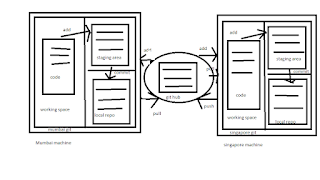
In other CVCS, develpers generally makes modificatons and commit there changes directly to the repository but git uses a different strategy. Git does not track each and every modified file whenever you do commit an operation. git looks for the files present int the staging area only those files present in the staging area are considered for commit and not all the modified files.
working directory --->add --> staging area -->commit--->Local repository---> GIT hub.
Commit -ID /Verison-ID/version
=============================
-> Reference to identity each change.
-> To identify who changed the file.
Tags
====
Tags assign a meaningful name with a specific version in the repository Once a Tag is created for a particular save even if you create a new commit, it will not be updated.
Snapshots
=========
->Represents some data of particular time.
-> It is always Incremental i.e. It stores the changes (appended data) only Not entire copy.
Commit
======
-> store changes in repository. You will get one commit-ID
-> It is 40 alpha-nueric characters.
-> it uses SHA-1 checksum concept.
-> Even if you change one dot, commit-id will get change.
-> it actually helps you to track the changes.
-> commit is also named as SHA1 hash.
Push
====
Push operations copies changes from a local repository server to a remote or central repo. This is used to stroe the changes permanently into the git repository.
Pull
===
Pull operation copies the changes from a remote repository to a local machine. The pull operation is used for synchronisation between two repo.
Branch
======
Product is same, so one respository but different task.
-> each task has one separate.
-> finally merges (code) all branches.
-> useful when you want to work parallely.
-> can create one branch on the basis of another branch.
-> changes are personal to that particular branch.
-> default branch is "Master"
-> File created in workspace will be visible in any of the branch workspace until you commit. Once you commit then that file belong to the particular branch.
Advantages of git
==================
-> free and open source
-> fast and small -> as most of the operations are performed locally, therefore it is fast.
-> security -> get uses a common cryptographic hash function called secure hash function (SHA1) to name and identify objects within its database.
-> No need of powerful hardware.
-> Easier Branching -> if we create a new branch, it will copy all the codes to the new branch.
Type of repositories
===================
Bare Repositories (central Repo)
-> store and share only
-> all central Repositories are bare repo.
Non- bare repositories (local repo)
-> where you can modify the files
-> all local repositories are non-bare repositories
Comments
Post a Comment